



What Technology & Features Does The Mazda MYMAZDA App have?
Your Mazda has a wide range of exciting features that can help make your driving experience easier, safer, and more enjoyable. One of these features is the MyMazda app, which allows you to connect your smartphone to your vehicle to gain access to additional functionalities and services. Check out this helpful guide to find out what MyMazda can do. View our new inventory today, or If you have any questions give us a call at (817) 663-7404.
What Is the MyMazda App?
MyMazda is a helpful app that gives you access to many features that make owning and driving your Mazda easier. The app is synced with your vehicle, enabling you to check its location, mileage, service history, maintenance schedule, and other aspects, all from the palm of your hand. It also gives you access to interactive guides and how-to videos that walk you through different features in your Mazda, such as the infotainment system, instrument panel, and navigation.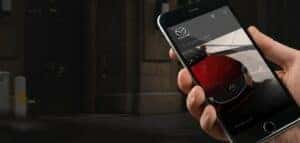
In addition, MyMazda also provides the contact details of your local Mazda service centers and sends you service coupons and offers, which can help you save time and money on routine maintenance.
What Are the Features Available on MyMazda?
From scheduling maintenance appointments to getting roadside assistance, the MyMazda app allows you to perform many tasks to properly manage your Mazda vehicle and improve your driving experience. The following is a list of features available on MyMazda:
- Vehicle status and health report: An active vehicle health report keeps you up to date with your Mazda, providing you with important information regarding mileage, fuel, oil level, and more.
- Maintenance alerts: Whenever your vehicle is due for routine maintenance, the app will send you an alert to remind you to schedule a service appointment.
- Full Circle Service Report: Every time you go to a Mazda service center for maintenance, you’ll receive a Full Circle Service Report that lets you know exactly what’s been done to your vehicle and what you need to keep an eye on.
- Promotion and coupon alerts: The MyMazda app can help you lower car maintenance costs by sending you alerts for service offers, promotions, and coupons whenever available.
- Vehicle finder: If you can’t find your car in a crowded parking lot, you can use the app’s vehicle finder feature to locate it.
- Mazda Mobile Start: The Mazda Mobile Start function lets you start, lock, and unlock your vehicle and remotely activate the panic alarm or climate control system. It essentially turns your smartphone into a key fob.
- Integrated navigation: If your Mazda comes with navigation, you can plan your route by sending your destination to your vehicle’s infotainment system from your mobile device.
- Mazda dealership locator: MyMazda tells you the contact information of the Mazda dealerships closest to you, allowing you to conveniently make service, recall, or other appointments from your smartphone.
- Vehicle how-to guides and videos: If you encounter difficulties with any of your Mazda’s features, such as the infotainment or navigation system, the app has how-to guides and videos that provide clear instructions for solving the problem.
- Roadside assistance: MyMazda also plays a vital role in helping you get out of emergency situations by giving you easy access to roadside assistance.
- Automatic 911 dialing: If you get involved in a major accident, your Mazda will automatically call emergency services on your behalf.
- Recall information: This feature keeps you informed of any recalls that need your attention.
- Mazda Connect and Bluetooth support: With the MyMazda app, you can connect your devices to Mazda Connect via Bluetooth, allowing you to access your favorite apps and services.
- Zoom-Zoom Magazine: Zoom-Zoom Magazine contains informative and interesting articles on a broad range of subjects related to Mazda, from its vehicles to innovations.
- FAQ: If you have questions about any aspect of your Mazda, the app has a FAQ feature that gives you the answers you’re looking for.
If you own an all-electric Mazda, such as the MX-30, MyMazda offers additional features to help you save time and hassle in keeping your vehicle charged. These features include the following:
- Electric vehicle (EV) status check: MyMazda gives you an array of useful information about your EV, including the charging status, charge level, remaining driving range, and time to a complete charge.
- EV remote control: With this feature, you can use your smartphone to remotely adjust the climate control settings, start or stop charging, and manage front and rear defog.
- Charging station search: This function enables you to look for a nearby EV charging station to juice up your Mazda, ensuring you won’t be stranded with a dead battery.
Which Mazda Models Have MyMazda?
From the Mazda3 to the CX-9, all late-generation Mazda vehicles provide access to MyMazda through a compatible device that already has the app set up. After you’ve downloaded the app onto your smartphone and completed your registration, you can access your phone’s interface on the infotainment display in your vehicle.
FAQ About the MyMazda App
Which Devices Are Compatible With MyMazda?
The device requirements for using the MyMazda app are IOS 10.0 or above for Apple devices and Android 7.0 or higher for Android devices.
Can I Use More Than One Device for the Same Account?
You can connect multiple devices to your MyMazda account, but you’re allowed to use only one device at a time. As a security precaution, you’ll be logged out of all other synced devices if you log in on an unfamiliar device.
How Do I Sign Up for MyMazda?
Signing up for MyMazda is easy and only takes a minute or two. After downloading and opening the MyMazda app, tap “Register” to begin the account registration process. Next, enter your email address, phone number, personal information, and a validation code sent via SMS. Press “Submit” to complete the registration.
Need More Information About the MyMazda App?
If you’re a Mazda owner in Fort Worth, Texas, and have any questions about the MyMazda app, get in touch with the knowledgeable and helpful team at Hiley Mazda of Fort Worth. Feel free to contact us via phone, email, chat, or our contact form. We look forward to hearing from you.
Mazda Vehicles For Sale In Fort Worth, TX
If you’re looking for a reputable Mazda service center in Fort Worth, Texas, visit us at Hiley Mazda of Fort Worth, from oil changes to brake services, Batteries, and more. We offer a full range of auto services to help your pride and joy deliver maximum performance and longevity. We also have an incredible Mazda OEM parts department if you are looking for Mazda parts. Don’t hesitate to contact us if you have questions about your Mazda’s gasoline requirements or maintenance needs.
0 comment(s) so far on What Technology & Features Does The Mazda MYMAZDA App have?